


Leveling Up: The Student’s Guide to a Professional LinkedIn Presence via AI
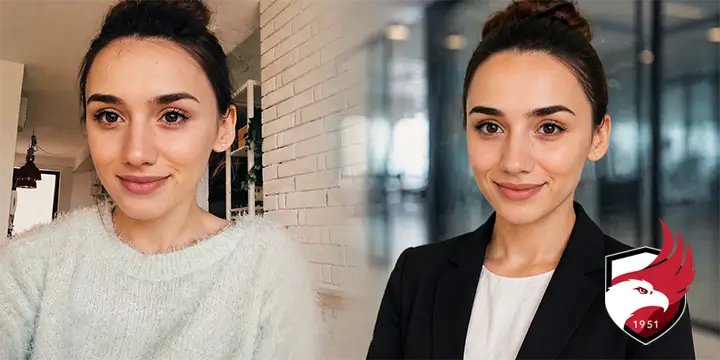
Transitioning to the professional world is a major milestone. Your LinkedIn profile is your digital business card, and your photo is the first thing a recruiter sees. The good news: you don't need to spend money on a professional photographer. Many AI tools can now help you bridge the gap between a casual snapshot and a high-end corporate headshot. As you can see from the image above, the results can be quite stunning and mimic a professional photo shoot.
Here is how you can use AI to transform your image into a professional asset.
Why a Professional-looking Photo is Non-Negotiable
In the 2026 job market, your profile picture is more than just a face — it’s a data point for recruiters.
- Increased Visibility: Profiles with professional-setting photos receive up to 21x more views and 36x more messages than those without.
- The "Digital Handshake": It establishes trust and credibility instantly, signaling that you are serious about your career.
- Industry Alignment: A well-chosen photo shows you already "fit" the culture of your target industry, whether it’s a formal law firm or a creative tech startup.
- Human Connection: In an era of remote work and AI-driven hiring, a warm, professional face makes you a real person to a hiring manager, not just a resume.
- Representation: While the first view is important, your picture should also be accurate. This helps prevent any surprises if you do receive an interview.
How to Take the Perfect "Source Image"
AI works best when it has a high-quality foundation. You don’t need a fancy camera, but you do need to follow these rules for your initial photo:
- Soft, Indirect Lighting: Stand facing a window during the day. Avoid direct sunlight (it causes squinting) or overhead room lights (which create dark circles under the eyes).
- Eye-Level Framing: Have a friend hold the phone at eye level. Looking down into a camera can appear submissive, while looking up can appear aggressive.
- The "Neutral-Plus" Expression: Aim for a slight, genuine smile. Think of the expression you’d have when greeting a respected professor or mentor.
- High Resolution: Use the back camera of your phone (not the selfie camera) for the highest detail. AI needs to see your "skin texture" to avoid making you look like a plastic mannequin.
- Minimal Distractions: Wear a simple shirt (white or light blue works best) and ensure your hair is tidy. Even if the AI changes your outfit, a clean neckline helps the "composite" look seamless.
AI Prompts for the Professional Look
Once you have your source image, you can use generative AI to "dress" yourself and place yourself in a professional environment. Here are prompts tailored for students:
- The Academic/University Vibe:
"Professional headshot of a [Gender] student in a modern university library background, soft bokeh or lightly blurred background, wearing a crisp light blue button-down shirt and a navy blazer, realistic skin texture, 85mm lens, natural daylight." - The Modern Tech Office:
"Casual business profile photo, modern open-plan office setting with blurred greenery and glass partitions, wearing a charcoal grey sweater over a collared shirt, approachable smile, high resolution, cinematic lighting." - The Executive/Formal Look:
"Corporate executive headshot, neutral studio background, wearing a tailored dark suit and white dress shirt, confident posture, sharp focus on eyes, professional studio lighting, 8k resolution." - The "Composite" Family-to-Pro:
"Maintain the exact facial structure and identity from the uploaded photo. Transform the setting into a professional office lounge. Change clothing to a navy blazer and khaki trousers. Ensure the lighting is bright and airy."
The Final Touch: Quality Control
Before you upload to LinkedIn, do a final "vibe check." Zoom into your eyes—do they look natural? Check your shoulders—are they level? The goal of AI enhancement isn't to look like a different person, but to look like the best, most prepared version of yourself.
Ready to make that first impression count? Grab a friend, find a window, and let’s get you hired.